Desktop Computer
Data Recovery
Lost critical files from your desktop? Accidentally formatted your hard drive? Drive making clicking sounds? We recover data from all desktop hard drive failures with industry-leading 96% success rate.
- All hard drive types: HDD, SSD, SATA, IDE, NVMe
- Deleted files, formatted drives, partition loss
- Physical damage recovery in Class 100 cleanroom
- No data, no charge guarantee - pay only on success
- Same-day diagnosis with transparent quote
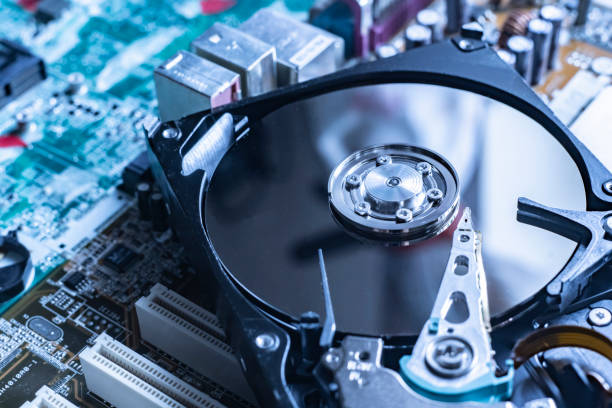
What is Desktop Data Recovery?
Desktop data recovery is the process of retrieving lost, deleted, or inaccessible files from desktop computer hard drives and SSDs. Whether it's a simple deletion or catastrophic hardware failure, we use advanced techniques and cleanroom facilities to recover your critical data with minimal risk and maximum success.
All Desktop Types
Tower PCs, all-in-ones, gaming rigs, workstations, mini PCs. We recover from Windows, Linux, and custom-built systems.
All Storage Types
3.5" HDDs, 2.5" SSDs, NVMe M.2, SATA, IDE, SCSI. From legacy 20GB drives to modern 20TB drives.
All Failure Types
Logical failures (deleted, formatted) and physical damage (head crash, motor failure, platter damage).
Fast Turnaround
Logical recovery: 24-48 hours. Physical damage: 3-7 days. Emergency rush service available.
When Do You Need Desktop Data Recovery?
Accidental Deletion
- • Permanently deleted files
- • Emptied Recycle Bin
- • Shift+Delete files
- • Lost important documents
Drive Failure
- • Computer won't boot
- • Clicking/grinding sounds
- • Drive not detected
- • Blue screen errors
Data Loss Events
- • Formatted by mistake
- • Virus/malware attack
- • Power surge damage
- • Partition loss
Common Desktop Hard Drive Failures
Understanding what went wrong helps determine recovery strategy. Click each category to see specific failures we recover from.
Accidental Deletion
Files deleted and Recycle Bin emptied
- •Files missing from folders
- •Empty Recycle Bin
- •Shift+Delete used
High - 98% success if drive not overwritten
Formatted Drive
Drive formatted accidentally or during OS reinstall
- •Empty drive
- •Lost all partitions
- •Quick format performed
High - 95% success for quick format
Partition Loss
Partition table corrupted or deleted
- •Drive shows as unallocated
- •RAW file system
- •Partition not recognized
Very High - 97% success
File System Corruption
NTFS/FAT32 corruption due to improper shutdown
- •Drive requires formatting
- •Cannot access files
- •Error messages
High - 96% success
Virus/Ransomware
Files encrypted or deleted by malware
- •Files renamed with .locked
- •Ransom note present
- •Files inaccessible
Medium - 70% without encryption key
Don't See Your Problem Listed?
We recover from hundreds of failure scenarios. Get a free diagnosis to know your exact situation.
Book Free Diagnosis →Desktop Recovery Pricing Calculator
Get an instant estimate for your desktop data recovery. Final price provided after free diagnosis.
Configure Your Recovery:
Payment Options Available:
Our Desktop Recovery Process
From drop-off to data delivery in 5 simple steps. Complete transparency at every stage.
Bring Your Desktop
Visit our Guntur lab or ship your desktop tower/hard drive. We also offer free pickup for local customers.
- Walk-ins welcome (no appointment needed)
- Free pickup available in Guntur city
- Ship via courier with tracking
- Remove only the hard drive if preferred
Free Diagnosis
Our technicians perform comprehensive diagnostics to identify the exact failure and recovery probability.
- Physical inspection of drive components
- SMART attribute analysis
- Platter and head condition check
- File system structure evaluation
- Success probability calculation
Get Your Quote
Receive transparent pricing with no hidden fees. You decide whether to proceed.
- Detailed cost breakdown
- Recovery timeframe estimate
- Success rate percentage
- Alternative options if available
- No obligation to proceed
Data Recovery
Expert recovery using advanced techniques. Physical damage handled in Class 100 cleanroom.
- Logical recovery: Software extraction
- Physical recovery: Component replacement
- Cleanroom work for head/platter damage
- Real-time status updates via SMS
- Regular progress reports
Verify & Pay
You personally verify recovered data before payment. No data = no charge.
- Review complete file list
- Open and check critical files
- Confirm data completeness
- Payment only if satisfied
- Multiple payment options
Our Process Guarantee
You receive updates at every step via SMS and email. Track your recovery status 24/7 through our customer portal.
Warning Signs Your Desktop Drive is Failing
Recognizing these symptoms early can mean the difference between 95% data recovery and permanent loss. Act fast when you see these signs.
Critical Signs - Act Immediately
Clicking or Grinding Sounds
Read/write heads damaged or stuck on platters
Power off immediately! Each power-on causes more damage.
Burning Smell or Smoke
Electrical component failure (PCB burnt)
Unplug immediately. Do not attempt to power on again.
Drive Not Detected in BIOS
Physical failure, motor failure, or PCB damage
Stop troubleshooting. Bring to lab for diagnosis.
Beeping Sounds
Spindle motor seized, platters not spinning
Do not power on. Requires cleanroom recovery.
Warning Signs - Take Action Soon
Extremely Slow Performance
Bad sectors developing, drive degrading
Backup immediately if possible, then bring in
Files Becoming Corrupted
Read errors, bad sectors, or file system corruption
Stop using drive to prevent data overwrite
Frequent Blue Screen Errors
Drive read/write failures causing system crashes
Note error codes, stop using, seek recovery
Disappearing Files or Folders
File system corruption or developing bad sectors
Do not attempt repairs, contact professionals
SMART Error Messages
Drive monitoring system detected failures
Backup immediately, drive failure imminent
Drive Shows Wrong Capacity
Firmware corruption or partition table damage
Stop using, data may still be recoverable
Experiencing Any of These Signs?
Don't risk permanent data loss. Every moment counts when your drive is failing.
💡 Prevention Tips
Critical Do's & Don'ts for Desktop Hard Drive Failure
What you do in the first hour after discovering data loss can make or break your recovery. Follow this guide exactly.
What TO DO ✓
Power off immediately if you hear clicking
CRITICALClicking indicates head damage. Each spin causes more platter scratches. Power off and unplug the desktop immediately.
Note the error messages
IMPORTANTWrite down exact BIOS errors, Windows error codes, or SMART warnings. This helps our diagnosis significantly.
Remove only the hard drive
HELPFULYou don't need to bring the entire tower. Just remove the hard drive (we can guide you) to make transport easier.
Bring power cable and adapters
HELPFULFor older IDE/PATA drives or custom connections, bring the SATA/power cables to help us connect it.
Stop using the computer
CRITICALEven if the drive is partially working, continued use can overwrite recoverable data permanently.
✓ When in doubt:
Stop everything and call us immediately. It's better to ask than risk making the situation worse. Our diagnosis is 100% free.
What NOT TO DO ✗
Don't run CHKDSK or disk repair tools
CRITICALWindows repair tools can permanently overwrite data. What seems like repair might destroy recoverable files.
Don't install data recovery software
CRITICALConsumer software writes to the drive, potentially overwriting deleted files. Professional recovery requires read-only access.
Don't open the hard drive casing
CRITICALEven a single dust particle can cause irreversible platter damage. Drives require Class 100 cleanroom environment.
Don't swap the PCB (circuit board)
CRITICALModern drives have ROM chips paired to platters. Wrong PCB can cause permanent firmware damage.
Don't reinstall Windows
CRITICALOS installation overwrites the boot sector and partition table, making recovery significantly harder and more expensive.
Don't try the "freezer trick"
IMPORTANTThis internet myth causes condensation damage. Modern drives have no benefit from freezing and can be permanently damaged.
⚠️ Already made a mistake?
Don't panic. Many cases are still recoverable even after running recovery software or CHKDSK. Contact us immediately for assessment.
🚨 Need Help Right Now?
Unsure what to do? Made a mistake? Our recovery specialists are available 24/7 to guide you through the critical first steps.
Real Desktop Recovery Success Stories
See how we've helped customers in situations similar to yours. Every case is unique, but success is our standard.
Family Photos & Videos Lost
Accidentally deleted 10 years of family photos while organizing folders. Recycle Bin was emptied.
Logical recovery completed in 18 hours. 98% of photos recovered intact with original folder structure.
12,450 photos + 340 videos recovered
Gaming PC Drive Failure
Desktop gaming rig drive making clicking sounds. Years of game saves, mods, and personal projects at risk.
Head replacement in cleanroom. Drive had platter damage from previous failed recovery attempt.
87% data recovered including all game saves
Formatted Drive by Mistake
Formatted 2TB desktop drive thinking it was external drive. Lost entire collection of movies and documents.
Quick format recovery using advanced file carving. Partition table reconstructed.
95% files recovered with names intact
Your Data Matters. Let Us Prove It.
Every recovery starts with a free, no-obligation diagnosis. We'll tell you exactly what's possible, how long it will take, and how much it will cost.
Get Your Free Diagnosis →Our Desktop Recovery Capabilities
Advanced tools, expert technicians, and proven techniques. We recover what others can't.
Drive Types We Recover
File Systems Supported
Brand Expertise
Recovery Techniques
Professional Equipment & Facilities
Class 100 Cleanroom
ISO-certified cleanroom for opening drives without dust contamination
World Clss Data Recovery System
Industry-leading hardware tools for firmware repair and low-level access
Professional Imaging Tools
sector-by-sector cloning tools specially designed for dammaged devices
Component Library
500+ donor drives for head, PCB, and motor replacements
Oscilloscope & Logic Analyzer
For diagnosing electronic failures and signal issues
Soldering & Chip Programming
Precision equipment for PCB repair and ROM chip work
Trust the Technical Experts
Our lab has successfully recovered data from drives that other labs declared unrecoverable. Advanced equipment + expert knowledge = your best chance of recovery.
Book Free Diagnosis →Detailed Recovery Case Studies
Real cases from our Guntur lab. Every detail documented – from diagnosis to successful recovery.
2TB WD Blue - Head Crash Recovery
1The Challenge
Desktop drive making loud clicking sounds. Drive had suffered head crash after sudden power loss during heavy write operation. Customer had 8 years of coding projects and client work.
2Our Diagnosis
- Head assembly damaged on platter 2 and 3
- Platter surfaces had minor scratches
- PCB and motor functioning normally
- SMART showing reallocated sector count: 2,847
3Recovery Solution
- 1Opened drive in Class 100 cleanroom
- 2Replaced head assembly with compatible donor
- 3Performed platter surface inspection
- 4Created sector-by-sector image bypassing damaged areas
- 5Extracted 1.8TB of data successfully
Final Result
"I thought everything was gone when I heard the clicking. Chipdigest recovered 91% including all my important projects. Worth every rupee!"
Your Case Could Be Our Next Success Story
Every recovery is documented with the same level of detail and care. Let our expertise work for you.
Start Your Recovery Today →Desktop Data Recovery FAQ
Get answers to the most common questions about desktop hard drive recovery
Still Have Questions?
Our data recovery specialists are available to answer your specific questions
Ready to Recover Your Desktop Data?
Get started in 3 easy ways – all options include free 2-hour diagnosis
Book Online
Schedule your drop-off time. Choose regular or emergency service.
Call Immediately
Speak with a specialist. Get instant guidance on next steps.
Live Chat
Get instant answers to your questions before booking.
Why 8,200+ Customers Trust Us
Join thousands of satisfied customers across Andhra Pradesh
Open Monday-Saturday, 9 AM - 6 PM | Emergency service 24/7
Located in Guntur, Andhra Pradesh | Serving all of India