Hard Drive
Data Recovery
Professional recovery from clicking drives, head crashes, and physical damage. Class 100 cleanroom facility for maximum success.
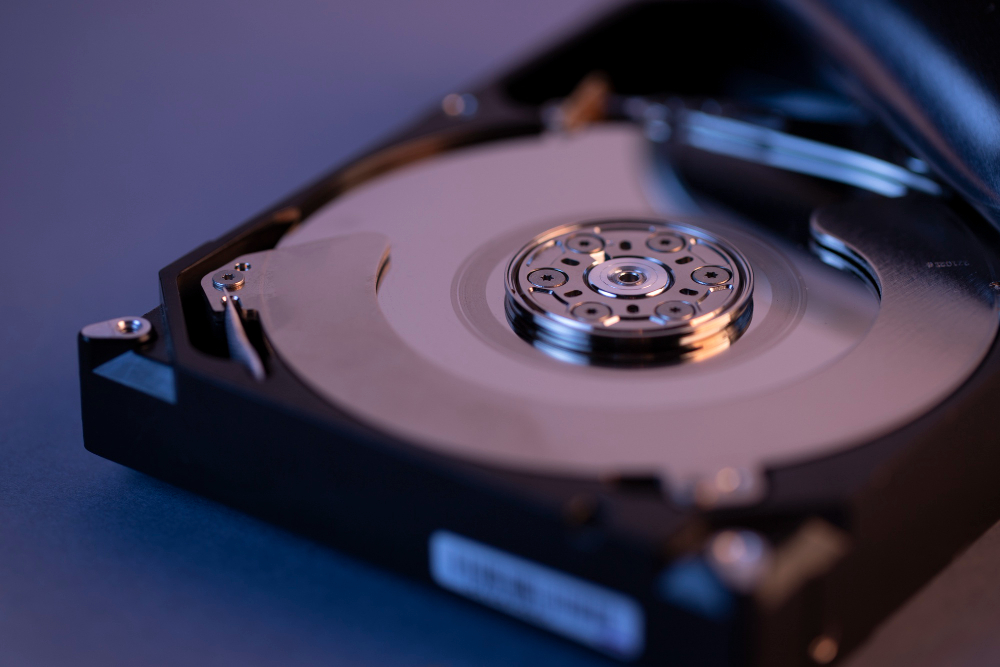
What is Hard Drive Recovery?
Hard drive recovery is the process of retrieving data from damaged, failed, or inaccessible storage devices using specialized equipment and cleanroom facilities.
HDD Recovery
Traditional hard disk drives with spinning platters
- •Head crash recovery
- •Motor failure repair
- •Platter damage recovery
- •PCB replacement
SSD Recovery
Solid state drives including NVMe M.2
- •Controller chip failure
- •NAND flash recovery
- •Chip-off techniques
- •Firmware corruption
Physical Damage
Cleanroom recovery for severe damage
- •Clicking/grinding sounds
- •Dropped drives
- •Water/fire damage
- •Multiple head failures
Logical Recovery
Software-based recovery solutions
- •Accidental deletion
- •Formatted drives
- •Partition loss
- •File system corruption
Why Choose Our Hard Drive Recovery?
We combine advanced technology with expert knowledge to achieve industry-leading recovery rates. Our Class 100 cleanroom and specialized equipment enable us to recover data that other labs cannot.

Select Your Hard Drive Type
Different drive types require specialized recovery techniques
3.5" Desktop HDD
Traditional hard disk drives with spinning platters
Common Failures We Recover From
Types of Hard Drive Failures
Understand what kind of failure your hard drive has and what that means for your recovery options and cost.
Drive is detected and works, but data is deleted, formatted, or file system is corrupted.
Deleted/ formatted data, missing partitions, RAW drives with no abnormal sounds.
Final pricing confirmed after cleanroom diagnosis. No data recovered = no charge.
Typical Symptoms
- •"You need to format the disk before you can use it" message
- •Accidental deletion of files or folders
- •Partition deleted, missing, or showing as RAW
- •Operating system not booting but drive visible as secondary disk
- •Files/folders not opening or showing corruption errors
Common Causes
- •Accidental format or partition delete
- •File system corruption after improper shutdown or power loss
- •Malware/virus modifying file system structures
- •OS reinstall over same drive/partition
Professional Recovery Approach
Logical failures happen when the data structure on the drive is damaged, but the hardware itself is still healthy and spinning normally.
- Do not write new data or reinstall OS on the same drive
- Create sector-by-sector image of the drive before work
- Use professional recovery tools to rebuild file system structures
- Deep scan for file signatures and carve files when table is badly damaged
Quick tip
If you are unsure of the failure type, power off the drive and bring it for a free diagnosis. Trying multiple DIY fixes usually lowers the overall success rate of professional recovery.[web:37][web:43]
High success, lower cost, software + lab tools.[web:40][web:37]
Each power‑on or hour of corrosion reduces success.[web:34][web:38]
Usually safe for data; board-level work needed.[web:34][web:38]
Require full cleanroom + advanced imaging strategy.[web:38][web:39]
Instant Hard Drive Diagnostic
Answer 4 quick questions to get immediate diagnosis and pricing estimate
What type of hard drive do you have?
Transparent Pricing Calculator
Get instant pricing estimate. No hidden fees, no surprises.
Larger capacity drives may require more recovery time
What's Included
- Free 2-hour diagnostic
- Professional data extraction
- Cleanroom recovery (if needed)
- Data verification session
- 90-day data warranty
- No hidden charges
You only pay if we successfully recover your data. Free diagnosis always.
Our Recovery Process
From diagnosis to data delivery in 5 transparent steps
Bring Your Drive
Bring your failed hard drive to our Guntur lab
What Happens:
- Walk-in anytime during business hours
- Internal or external drives accepted
- Free local pickup available
- Ship via courier with tracking
💡Pro Tips
- •Bring in original packaging if available
- •Note any unusual sounds or behaviors
- •Provide any error messages seen
Recognize Hard Drive Failure Signs
Identify symptoms and understand what they mean for your data recovery
Clicking Sounds
🔊Read/write heads crashed into platters
STOP immediately! Each click = more damage
Beeping Sounds
🔊Spindle motor cannot spin platters or heads stuck
Do not power on again. Cleanroom required.
Grinding/Scraping
🔊Head scratching platter surface
STOP NOW! Permanent data loss occurring
Whirring/Humming
🔊Motor working but heads not reading
Stop using, bring for diagnosis
Complete Silence
🔊PCB failure or power issue
Usually fixable. Good prognosis.
Experiencing These Symptoms?
Stop using your drive immediately. Every power-on can cause permanent data loss.
Critical Do's & Don'ts for Hard Drive Failure
These mistakes can make recovery impossible. Follow these guidelines to maximize your chances.
What TO DO ✓
Stop using the drive immediately when you notice problems
CRITICALContinued use can overwrite recoverable data. Every read/write operation on a failing drive risks permanent data loss. Power off and bring to professionals.
Note all symptoms: sounds, error messages, behaviors
IMPORTANTDocument clicking sounds, beeping, error codes, when it started. Take photos of error screens. This helps technicians diagnose faster and more accurately.
Keep the drive in safe, static-free environment
IMPORTANTStore in anti-static bag if available. Keep away from magnets, liquids, extreme temperatures. Transport carefully to prevent physical shock.
Bring the entire drive (not just platters)
CRITICALDon't open the drive. Dust contamination destroys data. Bring complete unit including PCB. Only cleanroom-trained technicians should open drives.
Act quickly for physical damage (clicking/beeping)
URGENTPhysical failures worsen with time. Clicking sounds = heads damaging platters. Each power-on cycle causes more damage. Seek help within 24-48 hours.
Check warranty before attempting recovery
IMPORTANTSome manufacturers void warranty if seal broken. Check warranty status first. Some include free data recovery services. Document serial numbers.
Golden Rule for Hard Drive Failure
When in doubt, stop and seek professional help. One wrong action can turn a 90% recoverable case into 0% recoverable. The first attempt at recovery is always the best attempt.
What NOT TO DO ✗
DON'T keep powering on a clicking/beeping drive
CRITICALClicking = head crash in progress. Each power-on cycle causes heads to scrape platters, creating permanent circular scratches. Stop immediately after confirming the sound.
DON'T open the hard drive outside a cleanroom
CRITICALSingle dust particle = permanent scratch on platter at 7200 RPM. Opening in regular room = 100% data loss. Only ISO Class 100 cleanrooms are safe for drive opening.
DON'T freeze or refrigerate the hard drive
CRITICALOld internet myth from 1990s. Modern drives have tight tolerances. Condensation causes corrosion. Temperature changes damage components. Never works, always causes harm.
DON'T swap PCB boards without ROM chip transfer
CRITICALPCB contains unique ROM chip with drive-specific calibration data. Swapping boards without transferring ROM = permanent data loss. Requires micro-soldering expertise.
DON'T use consumer recovery software on clicking drives
CRITICALSoftware can't fix physical damage. Scanning a failing drive causes more head-to-platter contact. Use only for logical failures (deletion, formatting) on healthy drives.
DON'T shake or tap the drive to "unstick" it
HIGHThis 90s trick for stuck heads doesn't work on modern drives. Creates additional physical damage. Spindle bearings and heads are extremely delicate.
DON'T attempt platter swap at home
CRITICALPlatters must align within 0.1 microns. Requires cleanroom, specialized tools, and years of training. Fingerprint on platter = permanent damage. Leave to professionals.
DON'T format or initialize to "fix" detection issues
HIGHFormatting overwrites file system structures. Initialize overwrites partition table. Both destroy recovery points. If drive shows "initialize disk", DON'T click yes.
DON'T use data recovery services from non-cleanroom labs
IMPORTANTPhysical recovery requires ISO-certified cleanroom. Non-cleanroom "recovery" = opening drive in normal room = dust contamination = data loss. Verify cleanroom certification.
DON'T wait months before seeking help for physical failure
HIGHPhysical damage progresses: lubricant dries, corrosion spreads, heads degrade further. Best results within 1 month. After 6 months, success rates drop 20-30%.
Already Made a Mistake?
Opened drive in normal room? Used freezer trick? Swapped PCB? Don't panic completely. Some cases are still recoverable, but success rate drops significantly.
Contact Us for AssessmentInternet "Solutions" Will Destroy Your Data
Freezer trick, PCB swapping, tapping drive, opening at home – these DIY methods from 1990s forums DO NOT WORK on modern drives. They cause permanent damage and make professional recovery impossible.
Our advice: Stop. Call professionals. Save your data.
Why Cleanroom Matters
Physical hard drive recovery requires specialized controlled environment and professional equipment. Here's what sets us apart.
ISO Class 100 Cleanroom
Our certified cleanroom maintains fewer than 100 particles (≥0.5 microns) per cubic meter of air
HEPA Filtration
High-Efficiency Particulate Air filters remove 99.97% of airborne particles
Positive Pressure
Constant airflow prevents external contamination from entering
Temperature Control
Maintained at 20-22°C with 40-45% humidity for optimal conditions
Anti-Static Environment
ESD-safe flooring, furniture, and equipment protect sensitive electronics
Technical Specifications
Particle Count Comparison
Why it matters: A single dust particle landing on a spinning platter at 7200 RPM creates a permanent scratch that destroys data. Opening drives outside a cleanroom = guaranteed data loss.
See Our Cleanroom in Action
Visit our Guntur lab and witness professional data recovery firsthand
Schedule Lab TourReal Hard Drive Recovery Case Studies
Detailed technical breakdowns of actual recoveries from our Guntur lab
Seagate 2TB - Severe Head Crash Recovery
1The Problem
Desktop hard drive storing 2 years of business accounting data, customer database, and inventory records suddenly started making loud clicking sounds. Drive not detected in BIOS. Customer continued to power on 4-5 times trying to access data before bringing to us.
Symptoms Observed:
- Loud clicking sounds (click-click-click pattern)
- Not detected in BIOS or Disk Management
- Drive spins up but no data access
- Started gradually - initially slow, then complete failure
Diagnosis:
Technical Findings:
2Recovery Process
Initial Assessment & Client Approval
Day 1Diagnosed head crash in cleanroom. Explained scoring damage from multiple power-ons. Customer approved ₹12,000 recovery cost.
Donor Drive Sourcing
Day 2-3Located matching Seagate ST2000DM008 donor with same firmware (CC26). Verified head compatibility.
Cleanroom Head Replacement
Day 4Opened drive in Class 100 cleanroom. Used HSA comb to park damaged heads. Swapped with donor head stack assembly. Precise alignment crucial.
Imaging Process
Day 5-10Connected to World Class DR System. Multi-pass imaging with timeout control. Bad sectors in scoring zones skipped and revisited. 12-hour continuous imaging session.
Data Verification
Day 11Extracted file system. Verified accounting files, customer database integrity. Cross-checked critical business records.
⚠️Challenges Faced
- •Circular scoring zones from clicking required sector-level analysis
- •Multiple head failures complicated recovery
- •Data in damaged zones needed multiple read attempts
- •Customer's repeated power-on attempts worsened damage
🔧Techniques Used
- Multi-pass imaging with adaptive timeouts
- Reverse imaging (from end to start) for better success
- Sector-by-sector analysis in scored regions
- Head position micro-adjustments for damaged areas
3The Results
Final Outcome:
All critical business data recovered including QuickBooks files, customer database, and inventory records. Customer able to resume business operations. Lost data was primarily old backups and temporary files.
Client Testimonial:
"My entire business accounting was on that drive. The clicking sound was terrifying. They explained everything clearly, recovered 95% of my critical business files. Professional service, worth every rupee."
4Key Takeaways
💡Lesson Learned
Multiple power-on attempts reduced success rate from potential 90% to 78%. Immediate professional help after first clicking sound is crucial.
Technical Notes:
- →Seagate Barracuda drives prone to head failure after 2-3 years
- →PCB swap alone would NOT have worked - physical head damage
- →Scoring zones showed 40% magnetic coating loss
- →Donor compatibility critical - firmware must match exactly
Have a Similar Hard Drive Issue?
These real recoveries demonstrate our expertise and commitment. Your data can be recovered too.
Hard Drive Recovery FAQ
Everything you need to know about hard drive data recovery
Still Have Questions?
Our hard drive recovery specialists are available to answer your specific questions. Get expert advice on your unique situation.
Your Hard Drive Data
Can Be Recovered
Professional cleanroom recovery • 89% success rate • No data, no charge
Book Online
Schedule your free diagnosis. Choose date and time that works for you.
Call Now
Speak with recovery specialist. Immediate guidance for your situation.
Live Chat
Get instant answers about your specific hard drive issue.
Clicking Sounds?
STOP using immediately! Each click = more damage. Emergency cleanroom recovery available.
Emergency RecoveryWater Damage?
Time critical! Bring within 24 hours. Do NOT power on. Free pickup available.
Urgent Water RecoveryWhat Happens Next
Quick Pricing Reference
Final pricing after free diagnosis. No hidden fees. No data = no charge.
Visit Our Guntur Lab
Guntur, Andhra Pradesh
Emergency: 24/7 (Call first)
Free local pickup
Free parking
Trusted by 9,000+ customers • 10+ years experience • ISO certified facility
Student discounts available • Corporate recovery services • Insurance documentation provided